
Showing posts with label Retro Computing. Show all posts

Sunday, 11 January 2026

Fredrik the Ball is Back: Spider Maze 2 in progress

 11th January 2026

First of all, a belated Happy New Year to all C64 and retro kind. At last, a new blog update and a new C64 project is in the making. Please read on to find out what is happening :)

Back in November 2018, I launched a public domain game called "Spider Maze" for the Commodore 64. It was a game I originally wrote in KickAssembler as part of a hobby based tutorial for Scene World. The game got finished off into a full game and got released on my T.N.D website. You can find it here.


Thinking about it, this game was launched just under 8 years ago, and I had so much enjoyment developing it. Now, partially during the winter of 2026, I am currently making a sequel. Once again, I am back in full swing coding with KickAssembler and CBMPRGStudio V4.7.0 once again. As usual, the graphics, and level design are being implemented using Charpad V2.7.6 and the game sprites are being created using Sprite Pad V2.0. The game will be crunched with Exomizer V2.0.11, especially the level data. Music aims to be made in either Goat Tracker Ultra V1.5.5 or Electronic Music System V7.03, but I have not decided which one to use yet.

Fredrick the Ball is returning on another adventure. This time not in a quest for greed, but on a rescue mission. His girlfriend Ruby has been kidnapped and is imprisoned inside the dungeon which is inside the lair of the spiders. In order to rescue her, Fredrik must pick up all the diamonds spread around 16 different zones. If he collects them all, Ruby will be free. Otherwise, if not then she will be sacrificed to the evil spiders.

The concept and old features

The game idea aims to similar to the original Spider Maze, but if you take a look at the snapshot below, you will notice that I made some improvements to the look and feel of the game. I also added a challenge to the game concept as well. There are the regular old features, where the player has to collect all the diamonds, whilst avoiding getting killed by the deadly spiders. The player can also pickup items to help or hinder. The bulb will charge the player up and make Fredrik invulnerable for a short period of time. However, he is not invulnerable against obstacles such as skulls. There is also the extra life heart, which can be collected on every 4th level. (Below you can see level 3's design)


New game features

There are also some new features blended into the game as well. The first are two collectibles. The first one represents the letter "B", which does nothing spectacular, it gives the player bonus points (Well 500 points to be honest). Also the second collectible implemented is a clock, which will either add or deduct time from the clock. This will remain a mystery to help or hinder Fredrik the Ball. Also if you take a look above, the score panel has a border around it. However the border will be animated and scroll around in order to make the panel more interesting. The panel has no flashing effects this time.

New deadly features for Poor Fredrick

There are some new deadly surprises implemented into the game as well. The first is that you have to race against the clock to complete each level. If the time runs out, the game ends. The second new surprise is that, not only will the player have to race against the clock and avoid the deadly skulls. The player also must make a safe path away from the deadly spikes (which starts on level 5) - even when invulnerable. This game is very cruel, but challenging, but the player will be starting with 5 lives.

If you take a look below, I have designed the first level (level 05 - not level 01), which features the deadly spikes. The spikes animate by rising and falling. The player can pass the spikes easily if a blank path is available.


My quick plan for Spider Maze 2


My plan for Spider Maze 2 is to feature 16 levels (I think the game perhaps could be hard enough with 16 levels). As you start each level, less time is available to complete it (by 200). The first 8 levels start with slow spiders, then levels 9-16 removes the drag rate of the spiders, forcing them to move the same speed as the player. The game aims to be more colourful and even more frantic compared to the previous Spider Maze.  

Other plans include making music and mixing sound effects with the in game music. I have not decided which music composer I will be using to make this new game, but it is likely that I could be using either GT Ultra V1.5.5 with SFX support or Electronic Music System V7.03 and code my customise sound effects. It is likely to be the first option, depending on time.


Target release date of the game

The release date aims to be some time in February 2026. This is not going to be a long game project, since the code from the first Spider Maze (Tutorial test version) is being adapted to this new game. Although I cannot give you a full date release when the game will be launched. The game will feature on my itch.io showcase when it is ready for release. Like all T.N.D games, Spider Maze 2 will be free to download and also an online web player version will be featured on my itch.io page.

Saturday, 30 April 2022

Cruiser-X 79: Fear the Freeze

 First of all, a quick note to let you know that during may, this project will be paused for a short period of time to make way for my 4K game for the Craptastic 2022 game development competition. It is unknown how long it will take me to write my 4K game. I'm hoping about 2 or 3 weeks or so.

Secondly some fantastic news about my levels. Saul has been working on updating my level designs, and they have been turning out pretty well. I am really pleased with the overall result from levels 2-5 (As level 1 needed nothing updated). Out of all of the levels so far, "Level 5" is my personal favourite.

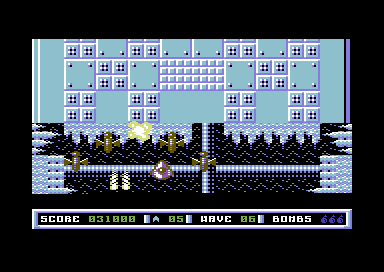
On Thursday and Friday, I started with designing Level 6 and yesterday I did some more updates to the level and finished making the map. Level 6 is a freezing cold stage in which contains plenty of ice. I used Level 3's graphics data, as there was a nice cube in the space background, which looks pretty good for this level. The colour scheme uses cyan, light blue and white. However, Saul might decide on some different colours. The player ship is cyan, but it still can be seen (thankfully). I wanted to make level 6 harder than level 5, so more deadly background was added.

Today I worked on adding the music and putting the test level together. The music which I have chosen for level 6 is a rendition of one of my trance tracks, Ice Dream, which I originally did for Scene World about 2 years ago. I did a PC remix of the same tune (See: Nucleo448 - Trance Remix) and also in Nucleo 448 as in game music. I liked this composition a lot, so I decided to do another version for Cruiser-X 79. 

The level data got exported as character set, tiles, map and music data. Then crunched through the Exomizer V3.1.1 (in V2 mode). The level table got modified once more. I compiled and run the game into VICE, and played all the way to level 6. Argh, I think I have made the level too difficult with all those big walls, which the player has to avoid. However, I will give those a tweak next time I go back into the game project, and of course before I work on level 7 (unless of cource Saul has done it already). However, I do like the ice-blue theme in that level and the wonderful in game music. 

That's it for now with Cruiser-X 79. The project is now paused for a short term until after my 4K Craptastic Compo 2022 entry is finished and submitted. Then I'll be back onto it.


Friday, 15 April 2022

Cruiser-X 79: Having green fingers

 This week was almost a week that wasn't for Cruiser-X 79. I was using the weekend to make a V1.2 of the SEUCK Title Screen Maker. However, I wanted to improve the utility and created a V1.3. Basically SEUCK Title Screen Maker is a utility that allows you to create a brand new front with a nice logo, with optional hi score table and music in the background without needing to code. Then replaces the old SEUCK title screen with something more colourful. After I thought I was done with V1.2, I replaced it with V1.3 by fixing the music player bug, and SFX missing channel bug. Everything else was working and I was very pleased that it was final.

If you fancy trying out the SEUCK Title Screen Maker V1.3 please check this link below:

https://richard-tnd.itch.io/seuck-title-maker


Anyway, this blog entry is NOT supposed to be about the SEUCK Title Maker. Instead it is about “Cruiser-X 79” and its progress. I had a week's break from it last week, as I felt a bit unwell with a heavy cold. It is more or less the Easter holiday, and I thought I should work on level 5 for the game. I have been thinking about it for some time. So far I had a level based in space, a level inside an enemy base, a diamond world, and also a bubble world. What was in store for level 5? … Vegetation.

Yes, that's right. I wanted to make an inner alien base, which also contains vegetation. Due to the limited number of collision characters. I did not want the vegetation to become a deadly background. Instead, they are background. I also created some brown zig-zags as the main background, rather than space. This is because I want that part of the background to have a static effect while the rest of the background was scrolling over it.

The design of level 5's base is based on the very first level. However there are to be some form of vegetation/plants bordering some parts of the background. The enemy base is also a mixture of green, brown and grey. I also wanted to add some boundaries, in which the player should avoid crashing into. Loads of them in fact. After I scanned through the whole map in Charpad. It took me about a couple of hours, if not more to carefully construct the level. Unlike level 4, the boundaries which the player can crash into are thicker and nastier.

After feeling very happy with the level design. I saved the background graphics and then exported the character set, tile and map data as a raw binary file for compiling and testing in the game. Before I compile and test everything, I decided to work on the music. I loaded up Goat Tracker V2.76 (enhanced version) and I worked on the main in game music. It is a thumping in game trance soundtrack. You can hear the whole tune (without the sound effects) in the video below. I think it fits into the level of this game quite nicely. The music was then imported into the game project source.

I modified the build parameters of the game code and the build batch file. Then I compiled and executed the project and gave the game a test run. The result turned out great.


If level 5 is cool. Wait until I work on Level 6. It's going be a cold themed level that is for sure. For now, enjoy the game play video of level 5 and also the music uninterrupted by SFX.


Wednesday, 14 April 2021

Cruiser-X 79 - April Update #1

14th April 2021  

Previous update was deleted along with the Para Lander DX blog entry. This entry from 3rd April  is what has been remembered from that day.

3rd April 2021

Last time I was dealing with alien patterns. The next task was to put these into levels. I also was setting up the colour settings for each level table. Of course, last time all aliens were put into order of sequence and were being tested.

That week (for this part in the development) I mainly focused on the level alien attack patterns. Instead of all aliens being in sequence 0-40. I setup alien selection tables for each level. The idea was to ensure that each table has a specific level of difficulty. There are 40 different alien tables (some of which are duplicated enemies doing different things). The idea is that the harder faster enemies get used after a few levels. There are 16 levels in total.

Now that all the alien patterns are in place for each level. There is not really much I can do to the game right now. Although I will need to work on doing different tunes for each level of the game. 16 different tunes might be too many to compose, so maybe I do a few tunes and then create a table to load specific music files. Still, that will do for now :)


Tuesday, 13 April 2021

theC64 Challenege #6 Para Lander DX - Part 2/3

 1st April - 13th April 2021 (Continued)

Last time in my blog I mentioned about the Para Lander Mini, and also how I thought the game was finished. Things did not really go according to plan. In this next part, this is where I decided to stick to 64tass instead of using Turbo Macro Pro. 


Last time

I prepared, designed and developed an enhanced edition of Para Lander DX on theC64 with aid of an Action Replay cartridge plugin, some C64 applications, including Turbo Macro Pro. I worked my socks off on the game project and finally came out with a working game. However things did not turn out how I expected. Although I had a fully working title screen, hi-score table and game. There were some elements missing in the game. So here is what happened.

A new intro - Nice

Friday last week I ended up with a new picture for a TND intro by Hugues. I worked on programming it, added a Future Composer soundtrack, and the result turned out great. I then packed and crunched the game with the Sledge Hammer II and Cruel Cruncher V2.5+ to continue with the old-school theme. Then I wrote the game documentation. Unfortunately however the game was still not ready to release. So it was back to the game code once more.

Random situation

The game was working out quite well, but the main problem was the game play. The zeppelins were moving slow across the screen but the game was just too easy to play. I decided to create a random table of speed and I set random speed timers and pointers to the zeppelins. Unfortunately however I was unable to continue using Turbo Macro Pro as once again, the bottom area of the screen messed up and this time it crashed. This de-motivated me more from using Turbo Macro Pro for this game. I must have used all the memory perhaps?

As a drastic measure I decided to from now with the project use the 64tass on my PC. I created the random tables, generated them and compiled the game (and crunched it with Exomizer) and run the game in VICE. It was working quite nicely. After I completed the first round, Zeppelins randomly changed their speed. I came across another issue. The zeppelins were going past too fast. 

This resulted to only setting the speed of the zeppelin to the slowest speed, and play with the drag rates, between 0 and 3. After compiling and sharing the build with Hugues and another tester. They felt that the game would be better off using levels. So ...

Rank up

I felt there was something missing in the hi-score display. The title and game have music, but the hi-score display re-uses the title music. I felt that there should be at least one more tune for the game. For this, I decided to browse through the HVSC under my name, and I found a tune I feel that would have been great for the high score table. Feel Great. As a bonus this tune was also composed in DMC V4.0. I relocated the music to $8000, and placed it into the game project c64 folder and re-built the source. It worked. Excellent.

Level up

Random zeppelins in the game code didn't really work out, so it was time to make levels. Actually that was pretty much simple. I deleted all of the random tables and I entered the drag speed value for each level. The table for each zeppelin's drag rate was 16 bytes. The drag rate was still set between 0-3. Although setting the drag rate of 3 to 2 sort of looks as if the zeppelins are moving at the same speed, but in fact the speed is actually set to faster. After setting up the last level the game should loop. I then re-linked the game to the TND intro and prepared for a release candidate on my Ultimate 64. Yet again I used the native C64 tools to pack and crunch the game, like it would have been back in the 1990's. I then sent the game to testers. Some bad news - there were still bugs.

Stop bugging me

I decided at the end that I'll just stick to using 64TASS and Exomizer for all the packing and linking of this project, but I can disguise it to look like some of the old memorable packers . This saves me having to mess about all the time using old packers and crunchers just for the sake of old-school - then finding out something else gone wrong with this project.

The bugs in the game were that the hi score name entry routine allowed unwanted characters, which made a mess in the name entry. This was supposed to allow alpha-numeric characters, delete, space bar and return keys only It turned out I had set an incorrect range value (perhaps a typo) that read from number 0 and all the PETSCII character code before shift+A. Pah!

The second bug was that the total number of levels = 15 instead of 16 before looping back to 01. I set an incorrect value in the level compare code. It should have read 17 as the max value instead of 16, otherwise it would have been 15 levels. I re-compiled the source and fed the project through Exomizer, and after a few seconds, the game was working. The game has now been sent to the testers. Hopefully this could be a better result. We'll have to wait and see.


Update: Still not ready yet, but nearly there. Fingers crossed ;)

Saturday, 27 March 2021

March 2021 Cruiser-X Progress Update #2

 27th March 2021

A couple of weeks ago I had left you with where I last left off. It was mainly based on the power ups based system. Now 2 weeks later, more work gets done. Last week, I finished off fixing the SEUCK Title Screen Maker disk, by fixing a bug in one of the example games (Which wasn't the fault of the title screen maker).

This session was mainly based on level setup. Of course I may not have the level graphics yet for level packing, etc. First I have to set up different sound effects for each bullet type the player carries.


I can still start on setting up the level scheme and enemy selection. Last time I managed to get all enemies to appear in order of sequence. Today I have been making a sequence for level 1 of the game. This is now based on the colour scheme table read, and also the alien selection table (based on levels).

After setting up the level routines, the enemies are able to fire bullets but the bullets do not collide into the player. So in order to fix this, a subroutine is programmed in to read the X, Y co-ordinate range of both sprites, and if inside the collision area. The player will die, unless a shield is in place. Then the player respawns.

Well, that looks good, but not really good enough. When shooting at aliens or shooting destructable background characters, The player should score points. A subroutine reads pointers for the player's score, lives and level. Then it copies it to the score panel on screen. I decided to do it this way this time round, because it is a way to prevent the player cheating by freezing the game with the Action Replay cartridge and editing the score/lives value with the screen editor. I cannot code protection routines, plus I cannot be bothered with those anyway :)

The enemy scoring should be based on the enemy sequence value that is used. I set a new table which creates the new score values for each alien, after it has been shot. The values are based as 1-5. Where 500 points is the maximum score which the player can score. Shooting background and collecting power ups also gives the player some points.So can the activation of the player's smart bomb (Which is triggered with the fire button).

The player's lives indicator also needed to be updated to decrement, and when lives have reached 00, the player will lose the game, and GAME OVER commences. Of course even if I was updating score, lives and level pointers (or restarting the game) I would need to update the score panel via a subroutine.  I am happy that it all seems to be working.

Now on to one final problem. The alien spawn sequence is set based on the chosen level, the enemy bullet can now kill the player, the score panel is working. The final problem for today - the aliens are firing too rapidly. How can that be solved? Simple, before randomly selecting the enemy to shoot a bullet. A delay pointer, and delay expiry counter should be set. Adding one of those makes the enemy fire bullets less rapidly. There is a chance I could make a table like with the scoring table, where I could base the enemy firing rate. That might be some time next weekend. We will have to wait and see. But for now, here's an updated video of my work in progress.


Tuesday, 26 May 2020

Cruiser-X 79 Update

1st May - 26th May 2016

While things have looked very quiet on this project. It doesn't mean that we are not continuing with the game project. In fact, the hardest part of the game code is practically out of the way. There are 16 alien formation tables set up so far, but there's still more to go. For the time being I have decided to leave the additional alien group property tables for the time being and focus on trying to get the main game engine repaired.

The aliens were unable to shoot at the time, and I tried to re-install the alien firing. However because I had deleted a lot of the old code (as I assumed it wasn't necessary) C64Studio processed loads of errors. I looked through the code, and tried to work a way round fixing the error result. Good news is that I managed to find the result. I re-created the enemy firing routine, selected the aliens to fire at random (via a pointer and value selector). If the alien was alive, the pointer and the bullet was out of the screen.

After fixing the alien firing I decided to fiddle about with the front end a little more. I added a flashing effect to the game's title screen. Also a page flip routine was added in order to flip between the front end credits and also the high score table. The result turned out pretty good.

Next the main game. The aliens were originally spawning in sequence. However, I didn't want the alien groups to spawn in order of the values 1 -17, so I setup the level pointers and some custom sequence tables to get the aliens spawning in a chosen value for that particular level. The video below shows you how the feature results during game play.


Update 11/09/2020: I just want to let you know that this game has NOT been cancelled. At the moment, I am stuck in a loop where on the coding side, I cannot really continue until the new set of level graphics come in. This project is therefore currently frozen until further notice.

Monday, 23 March 2020

Aliens Unleashed

23rd March 2020

Last Saturday, I mentioned about the problems I had with the alien movement patterns, where I made things a lot harder for myself. Especially the previous weekend. This weekend, I started on working on the alien movement groups. After Saturday's major change of the code and pointers. After following the Starfysh code, I finally got somewhere and I am now ready to continue with working on the alien movement groups.

Alien movement is based on time instead of position. Once the timer table has reached the end, the next group of aliens can spawn. I have a lot more groups of aliens to work on, which will take some time time to make. Or should I say, a lot of time to make. Especially when the total number of enemy sprites drawn result to 26. I have used the border cycle on screen as a clock, so I can count which byte the table is read at, and also where I should time out the aliens to stop them wrapping across the screen.

On the plus side, since the game preview was released Summer last year. The majority of the game code is still there. Although at the moment I have disabled the collision, in order to test the aliens for their movement.

The new set of tables are as follows:


enemy1framelo !byte <Frame_AlienType2 ;Store low-byte of alien frame
enemy1framehi !byte >Frame_AlienType2 ;Store hi-byte of alien frame 
enemy1colour  !byte $0a               ;Store colour of alien
enemy1startx  !byte $0c               ;Start X-Position   
enemy1starty  !byte $f0               ;Start Y-Position
enemy1score   !byte $01               ;Amount of points to score
enemy1lives   !byte $01               ;Number or hits to kill alien
enemy1time    !byte $18,$18,$18,$1c,$18,$18,$18,$18 ;Timed movement
enemy1speedx  !byte $00,$00,$00,$00,$00,$00,$00,$00 ;Speed of movement accordingly X
enemy1speedy  !byte $fe,$fe,$fe,$fe,$00,$00,$00,$00 ;"                             Y

Tuesday, 4 June 2019

Cruiser X-79 - Migrating to another base

2nd-3rd June 2019

Sunday, I came home and was wondering what I should do. I decided on doing some more work on Cruiser-X 79. I decided to carefully look at the code, and copy/paste it it from CBMPRGStudio to Endurion's C64Studio. I created a new C64Studio project and called it CruiserX79_2019 and copied and pasted the necessary files. Then afterwards, the hard work was to be done. I had to rename commands to match the ACME syntax. This took about an hour of my time. Then there was the correcting of syntax errors. The labels were mixed case. So I had to relabel those. The errors were then fixed. I compiled, compressed (with Exomizer) and then run the program. The game title screen was running perfectly, but when it come to starting the game. It crashed. I investigated the problem. The culprit was - an incorrect music file was copied. So I corrected this by copying the correct in-game music file and placed it into the bin folder. The game now worked.

While I was testing the migrated build of Cruiser-X 79. I had come across a nasty bug, which I came across a long while ago. The bug was pretty much unknown to me at the time. The issue was where after the player had lost a life. When the shield had run out, the player exploded straight away, without even hitting an enemy, bullet or deadly background. I investigating further into this bug and I found the main culprit that caused it. That was the player death and shield code. After the player was killed by an enemy a pointer PlayerIsDead is set as 1, indicating that the player explodes. All I needed to do was initialize the PlayerIsDead to zero. So that every time the player's shield is activated, the player should not be dead. That is of course until an alien or deadly background hits the player.

I'm happy very happy to present you with the result and show you a video of the game in action, with a vertical scrolling test map, with all collision working in place. I deliberately set the game into cheat mode, so that you can see that I have indeed fixed the nasty bug. Although there are still one or two minor bugs inside the game preview. Nothing too serious though. Enjoy!


Sunday, 20 January 2019

Cruising for a Bruising

20th January 2019 

Well, 2018 sure has been a bit of a roller coaster of a ride, where C64 productivity and time was concerned. I mainly have been busy on SEUCK projects, but finally I have got time to do what I want. I will be on an Assemble It tutorial game project later on this week, but today I decided to concentrate a bit more on Cruiser-X 79. 

So then, what has been done today?. Before launching the playable preview, I have been doing a little more design to the test game map, which Saul originally did. This was mainly because the map looked pretty much plain space after about a quarter of the game map was drawn. So I decided to add some more tiles into the game's map and I tried to make it look as cool as I could. As soon as I finished with the map, it was time for me to export it to the game project.

Next was to load up the CBM PRG Studio and tweak some of the game code. There were some bugs inside the game, where sprites could be visible in the black lines between the game screen and the score panel. I simply fixed this issue by moving a subroutine which masked blank sprites into that particular screen area. After re-compiling the game, I could see my trick was working.

The next trick to was deal with the main game engine. I found that while playing this game, the player ship was just moving way too fast. The player was able to crash into the aliens or the deadly background too quickly. So I reduced the X, and Y speed of the player, so that it was moving at the slowest X speed and the Y speed is near enough to the correct X speed of the player.

Following that, I wanted to tweak the power ups slightly. There are 3 different tiles, marked B, M and S. The B tile is the smart bomb, M is the missile upgrade, and S is the shield. I wanted to make some alterations to the smart bomb and the missile. I started with the missile. The player's missile did work, but shouldn't the player have to pay the penalty for a cost of a life?. I altered the life lost code, so that then the player's missile was set to default - every time the player dies and fires the next bullet when spawned again.

The Smart Bomb feature was the next for me to enhance. Last time (originally) the smart bomb had a bug in the code, in which while a batch of aliens were being destroyed. Half a batch visible may have destroyed, but other alien sprites of the same group appeared. This just didn't look good for me. So I decided to do something about it. I added a trick which was to explode all of the aliens in one go. This was done simply by setting the code to enable all aliens, and make them dead straight away.

While still working on the Smart Bomb feature. I felt that the smart bomb code should be changed. So I altered the feature by adding some flashing background, to indicate the explosion. Also the feature was better off not being automatic, but manual. So I added a new subroutine and pointer where the player checks for the bomb carried. If carried, the Space Bar key activates the smart bomb feature, which destroys all or spawning aliens and awards the player 500 points.

The player has a penalty feature. If the smart bomb is carried, and the player loses a life, it loses the smart bomb power up, as well as the bullet power up.

I was going to launch a playable preview of this game on to the TND web site today, but I have decided to postpone it, due to a weird collision bug that is in place in the main game's code. The sprite/sprite collision code needs to be re-written from scratch, and some of the code needs to be inside macros. Once this has been dealt with, a playable demo of the game will be launched on to TND. Watch this space.

Monday, 25 December 2017

It's Christmas ... Time to Follow that Starfysh

25th December 2017
 
First of all, Merry Christmas (Happy Birthday to me ;o)) and a Happy New Year. This will be my final Blog for 2017, and I have decided to talk about the production of my LATEST game release Starfysh. This is basically a horizontal scrolling shoot 'em up - which is not a SEUCK game, although I have released some enhanced SEUCK titles as well today.


Starfysh is a simple 4-level scrolling game, in which Earth has been severly damaged by an alien battle. Humans and dogs have been transported on to rescue stations. The stations are now being attacked by aliens. You are a commander of the Starfysh Elite. Your mission is simply to battle through 4 different zones, fighting the aliens. After you reach the end of one stage, you'll move on to the next. This game has no particular power ups, but it was inspired a little on some classic games like Hewson's Subterranea, and Mastertronic's Star Slayer. The player can be controlled using a joystick plugged into port 2. That's the fun part. Now for the production notes:

Programming

The game was programmed using C64Studio, while I had a lot of free time spare between October - November in the evenings, and weekends (Excluding Sundays). The game consists of only 4 different maps which are quite large and caused me to play around with moving data to different areas of memory. 256 tiles in fact. All levels were transformed from bitmap format to charpad, using the map importing option. At first there were some technical problems. There were too many tiles and chars. I wanted a limit of 256 tiles/chars. The tile + charset compression option was a very good help.

Graphics and Design
 
I managed to fit 3 levels in, but adding the fourth stage was really challenging.  Each level was squeezed down using the Exomizer level/memory compression mode (exomizer.exe -l mem $xxxx source.prg -o dest.prg. The example decompression source was used to extract the compressed graphics source. (Charset, tile set and map).

Before I had the game sprites by Shaun, I created some test sprites of my own (Which were created in Sprite Pad, and then imported into the C64Studio source code). The sprites later got imported into my little weekend SEUCK project 'Space Crumpets' (Along with test sprites for Cruiser X-79, which I also drew ages ago). Creating the sprites wasn't much of a problem, but moving them was quite a challenge. I could have used the Alien Formation maker, which I wrote about a year ago, but I didn't want to make this another X-Force type of game. Instead, I worked hard on programming sprite movement patterns, based on timing and sense of direction. Some aliens will just move across the screen, but some aliens will move in a different formation. Also, unlike X-Force, I added alien firing. I also wanted to do something different to the game. The player should have a shield at the start of the game, or every time a life is lost. Shaun came up with an idea, which was to create a damage count before the penultimate death for the player.

Shaun did some new sprites for the game. The sprites were designed and created using the Shoot Em Up Construction Kit. Shaun used this editor for sense of a purpose (Not for creating a SEUCK game this time). The sprites were imported inside sprite pad. Sprite animation had separate subroutines to animate at different speed. Shaun's sprite example in SEUCK had to be followed. This was so that I could match the actual speed of the alien sprites.

Designing the front end with logo and scroll text was pretty much straight forward. Shaun sent me some bitmap mockups, and I was able to port them to C64 charset and screen format, using CharPad. This helped me a lot, however the title screen data had to be split into two separate charsets. The reason being was that manually creating the HUD design was a really difficult and painful task. I had to find a way to cheat and save time doing this. So I captured first the text charset snapshot, which included the HUD design. Then I capatured the main title screen presentation mockup. I imported all of the graphics assets into the source code, and programmed a new front end, and a working score panel, which uses the HUD. EXCELLENT!


Music

Sound and Music was done using GoatTracker V2.7. The in game music style was slightly inspired by some tunes from the demo scene in the very late 1980's - early 1990's (The Dutch USA Music Assembler/Voicetracker era). This time round I didn't want to make any techno/trance music. I wanted to try a different style. The title music was a slight remix of one of my older tracks, I originally composed in the 2000 year. (Space Techno I think it may have been called). I made the remixed title tune sound more disco style, rather than techno. For the up scroll ending music, I went for an epic space ending theme.  Sound effects were also created using Goat Tracker.


Mastering (Tape+Disk)

The final mastering of the production. Before I could do that I asked Shaun if he was able to make a loading picture. He suggested that I contacted JonEgg. I spoken to JonEgg and asked if he was interested to draw the loading pic, JonEgg was. However Shaun drew me a temporary loading picture for the mastering - also just in case there was no loading picture at all.


I decided to do the first master, using my pre-built C64 tool 'Tape Master Pro V3.0'. Before I could do that I imported the assets 'Loading music', 'Shaun's picture' and game, and used a black screen with thin dark blue loading stripes scheme. This was Shaun's suggestion. A good result. However, when I was on the 1541Ultimate 2 page, I discovered that someone else used Tape Master Pro V3.0, on a C64 game, but the loader caused a few problems. I contacted Martin Piper to find out, and he introduced me to a new version of TapeToolBuild.

I had to recreate the tape loader using the TapeToolBuild source in scrollermusicloader.a as the source code had no ability to display a loading picture or use any additional code I would have wanted it. So I re-programmed some of the features from the Tape Master Pro V3.0 tape loader (The flashing text, scroll text, picture display and PRESS SPACE option). I also created my own source files to import/relocate the game and picture data through a PC. Also a custom loading stripes scheme. The result turned out how I wanted it.

The disk loader was pretty much straightforward. I used the exact same loader as I did for Let's Invade (A Space Invaders game, which I wrote last year). I placed a loading picture and music for Starfysh into the game. Bolted a TND intro before the loader. I chosen the latest intro I created earlier on this year (Rippled Dreams), and added a brand new tune to the intro. I imported the main game and used Excess' Dir Master V7.1 in VICE to change the load address of the main game to $2000.


Eventually I received an email from JonEgg, which he attached a new loading picture for the game. I loved it. :). This replaced Shaun's loading picture, but I felt that Shaun's pic should still be used. So I made a timed splash screen which quickly display's Shaun's pic and run i through the Exomizer.  Not a bad result.


I showed the Disk + Tape version of the game. He suggested that the disk version should have loading stripes. He wanted dark blue loading stripes. I tried implementing this feature into the .D64 version of the game. Sadly adding the function to the IRQ loading code LDA #$06 : STA $D020 : LDA #$00 : STA $D020 caused the Exomizer decruncher to crash instead of decrunch. Instead I replaced the border flash with INC $D020 and DEC $D020. That made a huge difference and the program worked absolutely fine. :)


Starfysh can be found and downloaded on to your C64 1541Ultimate2, Turbo Chameleon, CCS64, VICE or whatever at:

THE NEW DIMENSION - GAMES PAGE - STARFYSH

other presents (new releases) can be found at:

 THE NEW DIMENSION


Also, to support SDIEC users, the game has a kernal loading option (With stripes), but you still will be able to listen to the loading music after loading has finished.

MERRY CHRISTMAS, Enjoy the presents, see you in 2018 and have a HAPPY NEW YEAR!

Saturday, 7 October 2017

Cruiser X-79 Update #12

7th October 2017

This is a just a quick update. You may remember a couple of days ago, I mentioned about having trouble getting the tape loader to work using multi-load, and  the game crashed. I finally managed to get my way around this problem, simply by not triggering RTS after the loader had finished loading a file. Of course, I had to edit the game code, where RTS was originally called for setting up new levels. This was replaced with a jump start to the main game code. I also implemented the same code with the disk multi loader.

The tape turbo code also needed a slight altering, so that it could switch off the tape motor, call Exomizer to level-decrunch the program file loaded, then call a subroutine to check whether or not all files have loaded. If so, then jump to the main game code, otherwise keep on loading the level graphics data (Charset, tile set, map) until all 3 files have loaded in and run through Exomizer's decruncher. Thankfully, it all worked.

Now Cruiser X-79 can have digital disk and tape versions. :)

Thursday, 5 October 2017

Cruiser X-79 [UPDATE 11] - Not much ... Or is it?

5th October 2017

I really should have back dated this Friday+Saturday last week, as nothing had been done today. I've been running late. Anyway, last week, I was doing some brain storming, and slight of hand updating of the game code.

Originally Cruiser X-79 used a 3xIRQ interrupt, but since that was just UNECESSARY, I decided to reduce it to a 2xinterrupt instead. Reason being fixing the smooth scrolling, so that it could scroll smoothly.

Other implementations which had taken place last week was related to access to levels. The size of the game map 320 blocks in height. That is way too much for one file - even compressed. Now imaging having to pack 16 levels and try to cram that into a single file? Not really possible, due to the memory restrictions.


In order to solve this problem, I decided to implement a disk load subroutine, along with the Exomizer level decruncher. Each file to decrunch has to be a game character set, tile set and also a map. To make the level packing more simpler, I decided to create a project in Endurion's excellent C64Studio suite, and call Exomizer to compress each level file, and then import the files on to a .D64.Then I set up the file names, low + hi-byte of the END address of the program for Exomizer to decrunch. At first I had crashes, probably due to some silly mistakes I made into the code. After several attempts the code worked, and a working game / preview was in place. Brilliant.

This may sound as if the game is turning out to be disk only? Well, not necessary. I had a bash at making a 2-sided tape version of the game with TapeToolBuildV2, and my modified  version of Martin's source. Where after loading the game with picture and music. The front end comes on, then a message on screen should prompt the user to flip tape to side 2 and rewind (Or in .tap form, simply eject side 1 or the tap file, and then start side 2  - Since I use 1541Ultimate more than a tape - in order to reduce loading programs and finding load errors :D ).

Although this felt like a great idea. I had to disect Martin Piper's turbo loader system, through his source. So I created a second source, which made two loads for each file. Basically, the idea is to load a test pilot $0200-$0240, then load in the selected charset/tile/map file. After each file has loaded, the loader should point the end low/byte address to the decrunch address. Then call the loader again, another two times, then after the last decrunch. Run the game. Sadly this didn't work for me. The turbo did load the data to the correct end address, and the low/hi byte of the end address, did get stored to the correct self-mod decrunch from address of Exomizer. However, instead of actually running the decruncher, after loading (Where I added an RTS at the end of the loader (The loader is mean't to be a subroutine), the program crashed completely with a CPU JAM. I will need to investigate further into this issue. The test disk version loads fine. I'll let you know how I progress through making a .tap version of my game.

Saturday, 19 August 2017

Cruiser X-79 - Update #10

19th August 2017

More action has been taking place today. First of all, Saul suggested that I should reduce the animation speed for the aliens and also the explosion. Basically double the delay of the animation. Also I had a go at setting up level pointers, where after each level advances, the game sets up the next level settings. For example, pick out the chosen alien type, formation, level colour scheme, etc. I tried compressing a test level map, using Exomizer, then imported it into the source code 16 times, to set each level. Sadly this trick didn't work and caused a memory overflow.

In order to solve this issue. I have decided to make this game multi-load based. This means that after 1 level is complete, the disk or tape image should load the next game file.There is just not enough memory for me to place even 8 level compressed versions of test maps that exceed $0300 bytes (Compressed). I will make sure disk loading will also be SDIEC compatible as well. Tape version is intended to be mastered using Freeload or the Thunderload Multi-Load companion tool.

You will notice a slight difference in the game during this test video of cheat mode below.  :)

Friday, 18 August 2017

Cruiser X-79 Update #9

13th - 18th August 2017

Not much happened on the game programming front, but at least I made an effort to do something for the production. While I was away from this project for a few weeks or so, I recently received some new graphics for the game. It wasn't more levels, but graphics for a new front end. Saul Cross designed a great new logo for the title screen. So what happened this week? I programmed a front end and bolted it to the game, itself. Hope you like the result.

While I am waiting for the new level maps, I will be working on the order of alien attack patterns according to levels, and of course re-use the test level's map and setup different colour schemes for each level. Each alien attack pattern consists of 26 bytes, so hopefully I should have enough memory to store compressed levels of each map, then extract each level to address $4800-$5800 (since $5800 is the start address of the game's code). Each level should not exceed 320 4x4 blocks in height, as at the end of the 320th block row a level complete is automatically detected. :)

For now, here's the result of the title screen - although it is not official at the moment :) Enjoy the video.


Saturday, 24 June 2017

Cruiser X-79 - Update #8

20th-24th June 2017

It has been too hot this week, apart from yesterday and today. Despite the really hot UK weather I had recently, still that hasn't stopped  me from doing more on this game project. Quite a big update as well.

So then what has been happening this time round. For a start off I continued from a couple of weeks ago. This was where code was based on sprite / background collision. I originally worked on a subroutine where the player crashed should it hit a deadly character. Now this time I focused on the player bullet shooting to deadly background. I tried doing the bullet/background table read method, but that didn't quite work out. There were times where the player bullet kept on missing the deadly background and the bullet just flew over. A bit of additional hard work was required to this. I created a large listing to compare to a certain character to the bullet object position. If the central bullet reaches the deadly background, the bullet will disappear. Thus allowing the player to fire again. After testing this phase, things looked much better.

The next step was to do a little something different. I worked on the new title music for the game, using GoatTracker. I was unable to combine the title music with the other sounds, as there was a memory overlap. So I trimmed out the title music and placed it into a separate position and put it in the temporary preview title screen. I also programmed built in option where using a joystick in port 2 selects the sound mode (Music + SFX, Music Only, SFX Only, Silence).

Today I have been working on fixing some of the bugs in the game, and also adding some additional sprites. The sprites which represented Game Over and Stage Complete. In the stage complete phase, the player ship is automatically central before the Level Complete message appears on screen. During the player moving or the game over scene, all sprites get switched off, then after fitting the Game Over, Well Done screen, only 2 sprites are switched on.

The main game had some problems with the alien formation test. There were aliens that appeared incorrectly on screen while moving. I had forgotten to update offset code to reset the formation counter, so that aliens started in the correct position. After trying the game out, things looked very promising indeed. That was until, I came across the camel head aliens. They were flickering everywhere instead of using a proper formation. I managed to fix this problem by updating the low+hi byte tables for alien formation and properties. I tested the whole thing again and things looked a whole lot better.

As my final task today. I took a look at IRQ source code and tried to implement some subroutines. Reason being - The aliens and laser sprites were still visible over the black raster, that covers the scrolling background. In order to fix this problem, I altered the background colour to black (So no grey raster line could be seen). Then after that, a new subroutine was added to mask existing sprites as blank sprites. The trick worked, and the result was pretty good - although there is a minor glitch inside the score panel raster. It flickers for a split millisecond, but all in all, the game is playable.

Still no selected alien formation for each level yet, but that will be happening some time soon. Enjoy the latest video of what has been resulted this week.


Sunday, 11 June 2017

Cruiser X-79 Update #7

11th June 2017

Not much time has been spent on this project this week, due to other things, but at least I did put some of my commitment into this game project today. I did have a long weekend, but I have been working on some stuff for the demo scene, also been learning a bit of Unity PC Game development . This won't stop me from continuing C64 game projects. Anyway what has been happening today.

Although it doesn't really sound like much. In fact a lot of work was put into the game code. A new sprite/background collision had to be made, which corresponded to the player's bullet. The idea is basically to allow the player to shoot certain background objects in order to destroy them and score a few more points.

I used a similar approach to the player/background collision, but this time assigned the player bullet's central area to the background object. Should the centre of the player's bullet hit the background object, it should destroy it. I added a few JSR statements to check which background the bullet sprite should read, and then generated a subroutine which transformed the 4 chars of the background into a destroyed object. The player can shoot and destroy shutters, parked ships, stripey buildings and also the glass domes.

This is called by assigning a row+column into a zeropage, check the char co-ords and the char value of the zero page, then modify the charset to an actual new value.

See you Saturday next week (Hopefully) with another blog update to this project, where I update the bullet sprite/background settings to remove the bullet every time it fires at a high deadly background, and maybe setup the first level attack waves.

Friday, 26 May 2017

Cruiser X-79 Update #5

14th May - 26th May 2017

Lots of things have been going on over the past couple of weeks or so. I have such little time to put a lot of info about what has been happening into this blog. Also I don't have a video this time round. Anyway, here's what has been happening behind the scenes this time round:

First of I wanted to make some slight improvements to the background graphics, although some glitches still existed inside the background graphics. This was because I was only doing rough ideas, not actually implementing the proper games graphics. I will be looking for a C64 buddy to do this.

As well as this, I have been putting in pointers in which should call the low/hi-byte values of the alien formation tables. This also involved manually creating, drawing and testing enemy sprites for each formation. The idea is to later on, on each level call different alien formation to the game. A couple weeks before I created the patterns for the alien formation. After testing all of the formation today. I was happy with most aliens, but there were a couple of formation patterns that might need to be altered in the future. One pattern was very buggy.

Finally the player now has fully working power ups. Every time it picks up a rocket tile, a power up gets rewarded to the player. The player cannot fire a new power up / default bullet until after the last bullet has moved offset.

So far I am very pleased with the result. It looks as if the main game framework could be finished soon. Just some debugging to the interrupts, bullet firing and of course replacing tacky alien formation movement with a better custom formation. Also of course there is the alien firing bug, which needs to be fixed, to avoid bullets firing where you cannot see the aliens.

The background snapshot below looks entirely messy, but I'm hoping that there will be someone available to help me work on the in game graphics and game sprites.


Saturday, 29 April 2017

Cruiser X-79 - Update #4


Saturday 29th April 2017

Here comes yet more progress made with this great Commodore 64 game project. The game is starting to work out much better. The player / enemy bullet collision finally got implemented. I did have a few issues with the sprite/charset collision subroutine, so it was time to take a look at that. There were some missing values, so those got fixed in. This took some time and I felt quite frustrated with the sprite/background collision subroutine. I decided to take a look at the source code of X-Force to see where I actually went wrong. Sometimes it is always good to have backups of older game projects, when in doubt :)

After fixing those. I decided to work on a few additional background tiles, also swapped colour attributes. This is so that on later levels, all 3 colours of the background ($d021, $d022, $d023) can be different. The additional tiles build are power up tiles. The tiles got exported into the source code. The tiles made were a shield for player's invincibility – for a temporary moment of time, rocket tile – for increasing the player's laser speed and a bomb – for a press space bar smart bomb feature (not implemented into the source yet). I tried reading the player ship to background collision, it read fine for the shield and laser. Strangely enough however when I tried to call the collision test to the bomb tiles, the code seemed to have read the wrong part of the background, which caused a wrong area disappear. This will be looked at some time next week.

You may also remember last week I added a player death subroutine. There wasn't a lives indicator. So that got implemented today. The yellow diamond characters represent the number of lives (including zero) which the player has. After the player explodes, the yellow diamond becomes red. The player has 4 lives at the start of the game, and will eventually be able to get extra lives later on in the game – Not implemented yet. A Game Over jingle was produced for the game.

I also implemented a STAGE CLEAR message at the end of the level. Before the message appears on screen, I made it so that the player moves up.

Anyway, time to backup this project and show you yet another video preview. Yet some more bugs in the code, but this is still a WIP anyhow :)


Saturday, 22 April 2017

Cruiser X-79 Update #3

22nd April 2017

It has been quite a while since I last blogged something in. This time I have no video to show you, but a few snapshots, to prove more work has been done on the project.

Anyway what has been happening this week. Well, today in fact. Some more game sprites were drawn, and another 2 alien formation tables were set up. Although no path movement tables have yet been set. This will happen occasionally. Some new space ships were created to make alien waves move downwards, and diagonal through a table. There's also another downwards formation, where circular robotic ships move in different speeds. They appear in more than just one go.

I also focused on scoring. A score subroutine was added and linked to the enemy death subroutines, so that the player scores points per alien shot.

Then came the sprite/background collision. I referred to the source in Trance Sector Ultimate, to try and get a 2x2 char sprite/background collision, and even implemented one on the 2x3 characters. I wanted to give this game a Uridium/Warhawk type of feeling, so made it possible that the player can destroy background objects to boost the score. The other sprite/background collision resembles to the player / wall collision.

After adding the collision subroutines, the player was missing something vitally important. A shield counter - to give the player chance to escape collision, when in re-spawn mode. Also an explosion animation to the player. So that every time the player hit an enemy, when the shields are out it explodes.

Now here's the latest WIP video of the work that has been done so far on this project.


Tune in next time for another project update :)

Fredrik the Ball is Back: Spider Maze 2 in progress

  11th January 2026 First of all, a belated Happy New Year to all C64 and retro kind.   At last, a new blog update and a new C64 project is ...